
OBDeleven VAG
OBDelevenAuto & Vehicles
4.51.70K Reviews
- Version
- 0.107.0
- Installs
- 1.00M
- Age Rating
- Everyone
Screenshots
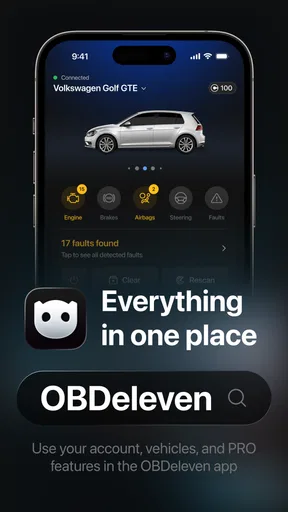
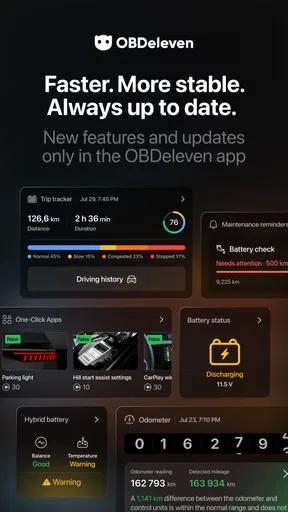
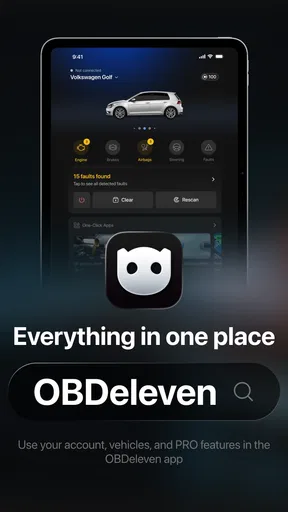
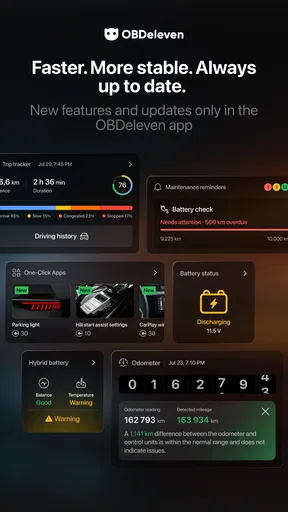
Our Review of OBDeleven VAG
 Analysis by Appyee
Before I plug a diagnostic device into a car, I ask a practical question: what do I want to learn, and what will I do with the answer? With OBDeleven VAG, the useful part is not simply seeing vehicle information on a phone. It is having a way to investigate a warning, watch selected readings, or consider a supported adjustment while standing near the car. That makes it a more hands-on choice than a general vehicle logbook, but it also means the experience depends on the car, the connected device, and the task at hand.
When a connection matters
This is an app for VAG car diagnostics, not a self-contained reference tool. Its main appeal comes into play when the phone can communicate with the OBDeleven device connected to the vehicle. I would think of it as a companion for a parked-car check or a deliberate coding session, rather than something to keep open while driving. If I want to understand a warning before booking a garage visit, being able to connect at home can make the next step less guesswork-driven.
That connection also shapes the limits of the experience. A Bluetooth pairing problem, an unavailable vehicle, or a task that needs more preparation can interrupt what seemed like a quick check. I would not treat a scan as a guarantee that every possible fault has been found, or assume that a code by itself identifies the failed part. It is a clue to investigate, not a substitute for sound diagnosis.
Using it around everyday ownership
The best everyday use I can see is a calm check when something changes: a warning appears, a feature behaves differently, or I want to look at vehicle readings while the car is safely parked. For example, if a dashboard light comes on before a planned trip, I could use the app and compatible device to read the available fault information, note what it says, and decide whether the car needs prompt professional attention. That is more useful than clearing a warning just to make the dashboard look tidy.
I would also use it as a learning aid. Live readings can help an owner become familiar with what the car reports under different conditions, but interpreting them takes care. A single value viewed at one moment rarely tells the whole story; comparing circumstances and understanding the relevant system matter. If I were unsure whether a reading was normal, I would use it to form a better question for a qualified mechanic, not as a reason to make a repair based on a guess.
Changes deserve a little restraint
Customizations are appealing because they can make a compatible car feel more personal, yet they are also where I would slow down. Before applying a change, I would check that it suits the exact vehicle and understand what it affects. A guided option may make the process easier to follow, but “guided” does not mean every adjustment is risk-free or reversible in every situation. I would avoid experimenting with an unfamiliar setting simply because it is available.
A sensible workflow is to make one change at a time, then check the result before moving on. That makes it easier to identify which adjustment caused an unexpected behavior. I would also avoid starting a coding task when I am rushed, when the vehicle is needed immediately, or when I cannot give the process my attention. For a driver who only wants routine servicing reminders or generic explanations of dashboard symbols, this level of vehicle interaction may be more than necessary.
Choosing it over simpler alternatives
Compared with a basic code reader, this approach can be more engaging for someone who wants phone-based diagnostics and vehicle customization in the VAG ecosystem. A simple reader may be a better fit if all I need is an occasional fault-code check with as little setup as possible. A workshop diagnostic system is the stronger option when a problem needs deeper testing, repair decisions, or professional equipment and expertise. The app occupies the middle ground: more involved than a basic lookup, but not a replacement for a mechanic.
Fit matters more than the number of available tools. OBDeleven is aimed at Volkswagen, Audi, Seat, and Skoda owners, so I would first confirm that my car is in the intended group and that the particular function I want applies to it. Even within that group, a feature should not be assumed to work identically across every model or configuration. If I drive a different make, or want a tool that serves a broad mix of brands, I would look at a multi-brand alternative instead.
What to check before relying on it
The app is free to install, and its current version is 0.103.0; it is listed for devices running Android 8.0 or later. It is developed by OBDeleven, has an Everyone age rating, and has been available since July 10, 2014. Its 4.4 average comes from around 44,000 ratings, with about 1,700 written reviews and more than one million installs. Those figures suggest that it has an established audience, but they do not tell me whether a particular car or coding task will suit my needs.
There are in-app purchases, with listed item prices ranging from $2.99 to $499.99. I would check the current in-app options before planning a purchase, and separate the cost of using the app from the cost of any required hardware. The practical question is not whether every tool is worth paying for; it is whether the feature I actually want is available for my setup and fits how often I expect to use it. Occasional code reading and regular customization are very different reasons to spend.
It is also worth deciding in advance how much vehicle information I want to inspect and when. I would connect for a specific purpose, take note of relevant results, and avoid treating a phone screen as a complete service history. For privacy-conscious use, I would review the app’s current settings and policies directly and share only the information needed when asking others for help. That is a sensible habit for any connected vehicle tool, especially when a forum discussion could tempt an owner to post more detail than the question requires.
Hey there! So, I recently got my hands on this nifty app called OBDeleven VAG car diagnostics, and let me tell you, it’s quite the game-changer for anyone who’s into cars. If you’re like me and love tinkering with your ride or just want to keep an eye on its health, this app might just be your new best friend. Let’s dive into what makes it so cool!
First Impressions and Setup
When I first downloaded OBDeleven VAG, I was a bit skeptical about how easy it would be to use. But, surprise! The setup was a breeze. You just need the OBDeleven device, which plugs into your car’s OBD-II port. Pairing it with the app via Bluetooth was quick and painless. This app is designed specifically for VAG cars (Volkswagen, Audi, Seat, and Skoda), so make sure you’ve got one of these bad boys before diving in.
The app itself has a clean and intuitive interface. It didn’t take long before I was navigating through menus like a pro. Plus, the app is available for both Android and iOS, so you’re covered no matter your device preference.
Diagnostic Features and Tools
One of the first things I noticed was the sheer number of diagnostic features packed into this app. You can scan your car for trouble codes, which is super helpful if your check engine light pops on and you’re not sure what’s up. The app gives you a detailed breakdown of any issues, so you’re not left in the dark.
But it doesn’t stop there. The live data feature lets you monitor various parameters in real-time, like engine RPM, fuel consumption, and more. It’s pretty wild seeing all this info right on your phone!
Customizations and Coding
Now, for those of us who love to add a personal touch to our rides, the customization options are where OBDeleven really shines. You can tweak settings that are otherwise locked down, like changing how your lights behave or even altering the dashboard display. The app provides guided coding, which makes it easy to apply these changes without fear of messing anything up.
There’s also a cool feature called One-Click Apps. These are pre-configured settings you can apply with, you guessed it, a single tap. It’s perfect if you’re not super tech-savvy but still want to make some adjustments.
Community and Support
One of the things I love about OBDeleven is the sense of community. The app has an integrated forum where you can ask questions, share tips, and connect with other car enthusiasts. It’s a great way to learn more and get the most out of your app.
Customer support is also top-notch. Whenever I had a question or needed help, the team was quick to respond and super helpful. It’s nice knowing they’ve got your back if you run into any issues.
Subscription and Pricing
Now, let’s talk about the cost. The app itself is free, but to unlock all the features, you’ll need a subscription. There’s a basic plan that gives you access to essential features, but if you’re serious about diagnostics and customizations, the pro version is the way to go. It’s a bit of an investment, but if you’re a car enthusiast, it’s totally worth it.
Final Thoughts
All in all, OBDeleven VAG is a fantastic tool for anyone who wants to keep their car in top shape or just have a bit of fun customizing it. It’s user-friendly, packed with features, and supported by a great community. Whether you’re a casual driver or a die-hard car lover, this app has something for you.
So, if you’re ready to take control of your car’s diagnostics and features, give OBDeleven a shot. You might just find yourself wondering how you ever lived without it!
My connectivity verdict
For me, the strongest reason to choose this app is the combination of vehicle access and a phone interface, not the idea that every check can happen anywhere. I would install it if I owned a compatible VAG car, had a clear reason to use diagnostics or coding, and was comfortable treating the phone as a tool that needs a working connection to the car. If I only wanted a quick, occasional answer and had no interest in adjustments, a simpler reader or a mechanic’s inspection would be less involved.
In the Auto & Vehicles category, OBDeleven stands out most for owners who want to explore their own car rather than merely record fuel or maintenance. Its free download lowers the barrier to trying the interface, while in-app purchases mean I would check the exact feature and cost before committing to a particular workflow. My advice is to start with one concrete goal, such as understanding a warning or learning how a supported setting works, and avoid changing multiple things at once. Used that way, it can make vehicle information more approachable without pretending that a phone app replaces careful diagnosis.
Verdict
Strengths of OBDeleven VAG
- Easy-to-use interface for all users.
- Comprehensive diagnostic capabilities.
- Supports multiple VAG car models.
- Real-time data monitoring available.
- Regular updates and improvements.
Limitations of OBDeleven VAG
- Requires internet for full functionality.
- Limited features in the free version.
- In-app purchases can be pricey.
- Compatibility issues with some devices.
- Initial setup can be time-consuming.
Similar Picks in This Category
View All
Android Auto
Google LLC4.1

maxim — order a taxi & food
PT. SITO4.7

Штрафы ГИБДД: проверка с фото
Pays LLC – Штрафы ГИБДД4.7

Номерограм – проверка авто
Авто Ассист4.8

Дром Авто
Дром4.9

Frequently Asked Questions
What is OBDeleven and how does it work with VAG cars?
OBDeleven is a comprehensive car diagnostics app specifically designed for VAG (Volkswagen Audi Group) vehicles. It connects to your car via a Bluetooth-enabled device, allowing you to run diagnostics, customize settings, and monitor vehicle performance through your smartphone. This tool is highly valued for its user-friendly interface and extensive functionality.
Is OBDeleven compatible with all VAG vehicles?
OBDeleven is compatible with a wide range of VAG vehicles, including models from Volkswagen, Audi, Škoda, and SEAT. However, it's essential to check the specific compatibility of your vehicle model and year on the OBDeleven website or within the app to ensure full functionality and support.
What features does OBDeleven offer for car diagnostics?
OBDeleven offers a variety of features for car diagnostics, including reading and clearing diagnostic trouble codes (DTCs), accessing various control modules, and performing adaptations. Users can also customize car settings, monitor real-time data, and use the app's one-click coding feature for quick adjustments. The app caters to both professional mechanics and car enthusiasts.
Does OBDeleven require a subscription or any additional fees?
While the OBDeleven app itself is free to download, certain advanced features require a subscription or in-app purchases. Users can opt for a Pro version, which offers extended functionalities such as adaptations, coding, and service resets. It's advisable to review the pricing options and determine which features suit your needs before subscribing.
Can OBDeleven cause any issues with my car's warranty or performance?
Using OBDeleven responsibly should not affect your car's warranty or performance. However, improper use, such as incorrect coding or modifications, could lead to unintended consequences. It's recommended to follow the app guidelines and, if unsure, consult with a professional mechanic to ensure safe usage and preserve your vehicle's warranty status.
